
FarOut
FarOutMaps & Navigation
4.51.46K Reviews
- Version
- 15.7.4
- Installs
- 100.00K
- Age Rating
- Everyone
Screenshots
Our Review of FarOut
 Analysis by Appyee
I reach for FarOut when a hike depends on following a particular route rather than simply finding my way around a town or park. It is an outdoor navigation app from FarOut, and its appeal is clearest when I can prepare before leaving and use trail-focused information along the way. I would not treat any phone map as a substitute for judgment, but I do like having route context and fellow hikers’ notes in one place. Whether it suits you depends less on how often you hike than on the kind of information you want while you’re out.
Where it fits among navigation apps
For everyday driving, errands, or a quick walk on familiar streets, I would stick with a general-purpose map app. Those tools are built around broad navigation needs; FarOut is more compelling when the route itself is the point and details contributed by other trail users can help you plan. That distinction matters: it is not a reason to replace every map on your phone, but a reason to consider a dedicated trail tool for trips where losing service or missing a junction would be a bigger concern.
FarOut sits in the maps and navigation category, is free to install, and is rated for Everyone. The app has a 4.4 average from around 3,100 ratings, with more than 100,000 installs. I see those figures as useful context, not proof that it will cover the route I have in mind. Before relying on any trail app, I would check that the specific route and information I need are available and prepare the relevant material while I still have a dependable connection.
Who will get the most from it
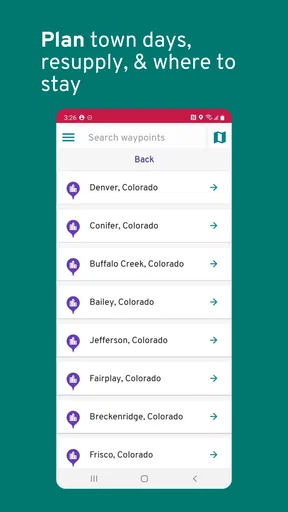
I think it makes the most sense for hikers and backpackers who want to look beyond a simple line on a map. A route can involve choices about water, elevation, or a potentially tricky section, and notes from people who have recently been there can help me think through those choices. Bikepackers and people planning paddling or rafting trips may also find the outdoor focus more relevant than a navigation app designed mainly for roads, though the value still depends on whether FarOut covers their intended route.
It is less suitable if you only need turn-by-turn directions around town, want one tool for every kind of transport, or have not checked whether the trail you plan to visit is represented. I would also avoid making a trip depend on a single app: a phone can run out of power, a downloaded map can’t tell you that conditions have changed since the last report, and a comment is not a guarantee that a water source or passage is safe today.
A more useful way to prepare
My practical advice is to do the fiddly work at home: identify the route you expect to follow, download the maps and trail information you need, and confirm that they open before you leave. Then use the app as a reference rather than constantly staring at the screen. Checking at a junction or before a section where you have a genuine decision to make is more useful—and easier on your battery—than repeatedly waking the phone just to reassure yourself that you are still moving.
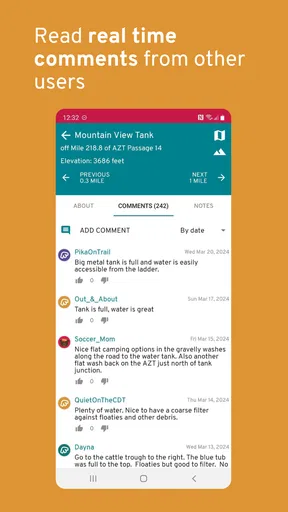
I would read community notes with dates and context in mind. A report that a source was flowing or a path was clear can be valuable, but it describes what another person encountered, not a promise about what I will find. If a comment changes my plan, I would weigh it against the map, the conditions I can observe, and any backup route I have considered. That habit turns user contributions into one input for judgment instead of treating them as official instructions.
Price, version, and day-to-day expectations
The app itself is free, while in-app purchases range from $1.99 to $96.00 per item. I would check the cost of what I actually want before building a trip plan around it; “free” does not necessarily mean every route or resource I might want is included at no charge. The current version is 14.11.7, and the app was released on November 13, 2018. Those facts show that FarOut has been around and continues to have a current version, but a version number alone does not tell me exactly what changed or whether a particular feature has been improved.
For someone already using it, the sensible approach is to review the app after an update and make sure saved or downloaded material is ready before the next outing. I would not assume that an update changes the trail data itself, nor would I postpone checking route availability because the app has a newer version. FarOut is developed by FarOut and requires Android 8.0 or later; people using an older Android device should check compatibility before counting on it for a trip.
Navigating the Wilderness
The first thing that struck me about FarOut is its intuitive interface. From the moment you open it, you’re greeted with a map that’s just begging to be explored. The app focuses on providing detailed trail information, which is crucial when you’re out in the wild. I found the map highly responsive, and it didn’t drain my battery as much as I feared—always a win when you’re out there for the long haul.
Trail Information at Your Fingertips
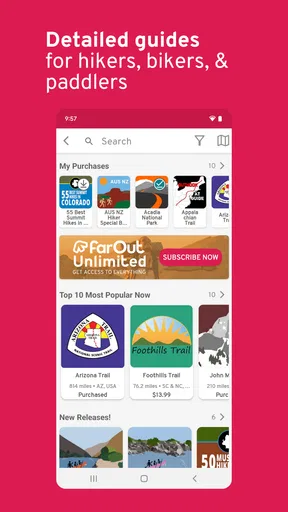
The app boasts a comprehensive library of trails across various terrains. Whether you’re a newbie or a seasoned hiker, the app has something for everyone. I love that it includes user-generated content—real-time updates from fellow hikers who’ve walked the path before you. It’s like having a community of explorers in your pocket!
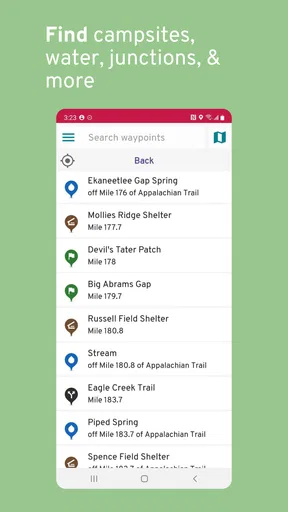
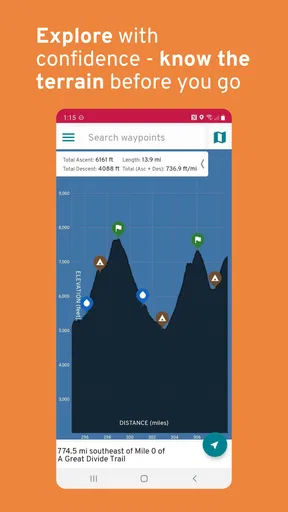
The trail descriptions are detailed and include everything from elevation changes to water sources and potential hazards. I found the water source information particularly useful on my last hike; it saved me from carrying gallons of water, which is always a bonus.
Offline Capabilities
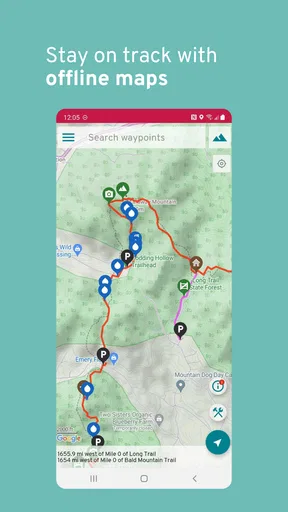
One of the standout features of FarOut is its offline capability. You can download maps and trail info before you head out, ensuring you’re never stuck without guidance, even in the most remote areas. This was a lifesaver on a recent trip where my phone lost service just as I was about to start a trail. With FarOut, I didn’t miss a beat.
Offline preparation is especially useful when a trip begins in a signal-poor area. I would still open the downloaded material before setting off, rather than assuming that a successful download automatically means every detail is ready to view. If I’m driving to a trailhead with a companion, I also like to agree on the route and a simple fallback plan before reception disappears. That way, the phone supports a shared plan instead of becoming the plan.
Community and Safety
FarOut isn’t just about maps; it’s about connecting with a community of fellow adventurers. The app allows you to leave comments and updates on trails, which means you’re getting the most current information possible. It’s like having a trail buddy who’s always got your back! Plus, knowing that others have recently traveled the path you're on adds an extra layer of safety and comfort.
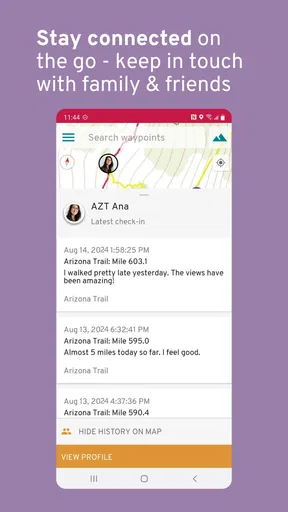
And let's not forget the safety features. The app’s ability to share your location with loved ones is invaluable. Whether you’re solo hiking or with a group, peace of mind is priceless.
Customization and User Experience
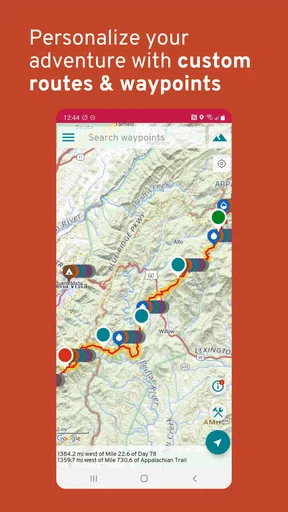
FarOut offers a level of customization that I didn’t expect but thoroughly appreciate. You can tailor the app to display metrics that matter most to you, whether that’s elevation gain, distance traveled, or something else entirely. The user experience is seamless, making it easy to switch between trails and information tabs without any hassle.
The app’s clean design and user-friendly interface make navigation a breeze. Even if you’re not tech-savvy, you’ll find it straightforward to use, which is crucial when you’re trying to focus on the trail and not your phone.
Final Thoughts
FarOut has truly transformed my hiking experience. It offers a perfect blend of technology and community to enhance your outdoor adventures. While there are many apps out there that promise the world, FarOut delivers with its comprehensive trail information, offline capabilities, and active user community.
So, if you're ready to take your outdoor explorations to the next level, give FarOut a try. Pack your gear, download your maps, and let the adventure begin. Trust me, you won’t regret it!
Making it part of a real trip
On a weekend hike with a friend, I would use FarOut in two different ways: first at home, to review the route and save what I need, and later on the trail, to check a junction or compare a recent note with what we can see. If the route includes a known water stop, I would treat the app’s information as a planning aid and still carry enough water for uncertainty. That balance is more useful than using a comment as permission to pack less.
For a longer outing, I would also decide in advance who is keeping the phone accessible and who knows the intended route. If I’m hiking solo, sharing my location can help someone at home understand where I am, but it does not replace telling them when I expect to check in or what to do if plans change. A navigation app can make a good trip plan easier to follow; it cannot make an unclear plan safe by itself.
What I would keep in mind
The main trade-off is that detailed outdoor information is only useful when it matches the place and trip I’m planning. A community update may be recent but still describe a different section, direction, or condition than the one I will face. I would check the route carefully before setting out, and I would not assume that a popular trail has the same coverage or reporting quality as another one.
I also wouldn’t choose FarOut as my only option for navigation if I need broad road directions, public-transport planning, or a simple map for an unfamiliar city. A mainstream mapping app is usually a better fit for those tasks. For a trail day, though, having route details and community observations together can be more useful than switching between a general map and scattered notes—provided I have prepared offline and understand the limits of what those notes can tell me.
My recommendation
If you hike or plan an outdoor route often enough to value trail-specific context, I would try FarOut and see whether it covers the places you actually go. It is a less obvious choice for someone who only takes occasional short walks on well-marked local paths, especially if a basic map already does everything they need. The app is most convincing when preparation matters: select the route, save the relevant material, check the information before leaving, and keep a backup plan in mind.
That is the approach I trust most: use FarOut to make better-informed decisions, not to hand over every decision to a screen. Its combination of maps, trail information, offline access, and user contributions gives it a clear purpose, while the need to verify route fit and interpret reports sensibly keeps it from being a set-and-forget solution. For the right kind of trip, I’d be glad to have it ready before I step onto the trail.
Verdict
Strengths of FarOut
- Comprehensive trail maps available offline.
- Real-time GPS tracking enhances safety.
- User-friendly interface for easy navigation.
- Detailed elevation profiles for planning.
- Community-driven tips and reviews.
Limitations of FarOut
- Requires subscription for premium features.
- Limited urban area coverage.
- Occasional GPS inaccuracies in dense forests.
- High battery consumption on long hikes.
- User-generated content can vary in quality.
Similar Picks in This Category
View All
Uber - Request a ride
Uber Technologies, Inc.4.7


inDrive. Rides with fair fares
® SUOL INNOVATIONS LTD4.8

Yandex Go: Taxi Food Delivery
Mikromobilnost LLC Belgrade4.8

Bolt: Request a Ride
Bolt Technology4.8

Rapido: Bike-Taxi, Auto & Cabs
Rapido Bike Taxi4.8
Frequently Asked Questions
What is FarOut and what are its main features?
FarOut is a navigation app designed for outdoor enthusiasts, offering detailed maps, GPS tracking, and route planning for hiking, biking, and other adventures. Key features include offline map access, real-time location sharing, and personalized trip logging, making it an essential tool for explorers seeking reliable navigation in remote areas.
How does FarOut handle offline navigation?
FarOut excels in offline navigation by allowing users to download maps and route data in advance. This ensures that even in areas without cellular service, you can access maps and track your location accurately. The app uses GPS technology to keep your position updated, providing peace of mind during your adventures.
Is FarOut suitable for beginners in outdoor activities?
Yes, FarOut is beginner-friendly due to its intuitive interface and comprehensive guides. It offers step-by-step instructions for using its features, and the community feedback feature provides insights from experienced users. This makes it easier for newcomers to plan and execute safe outdoor trips, whether hiking, biking, or camping.
What are the pros and cons of using FarOut?
Pros of FarOut include its detailed maps, robust offline capabilities, and user-friendly interface. The app also boasts a strong community feature for sharing insights. However, cons may include occasional bugs and the need for in-app purchases for premium map content, which might be a downside for some users.
How does FarOut ensure user safety during trips?
FarOut enhances user safety by offering real-time location sharing, allowing users to keep friends or family updated on their whereabouts. It also includes alerts for hazardous areas and weather updates. The app's capability to work offline ensures consistent access to navigation tools, even in remote locations.
